A Next-Generation Corporate Gifting Platform

Role

UX/UI Designer – Lead Designer

Year

2023-2025

Project Status

New Platform

Project Background

Nicklas provides innovative solutions for corporate swag, holiday gifts selection platform, and event gifting. To stay ahead in a highly competitive market dominated by well-established companies, Nicklas set out to develop a next-generation gift selection platform—one that would disrupt the industry with a fresh, innovative approach.

The goal was to go beyond traditional offerings and introduce a visually engaging, user-friendly platform with unique features that competitors lacked. 
The platform is sold to companies, while the end users are employees selecting gifts through the platform.

Initially envisioned as a gifts selection website, the platform quickly evolved into a comprehensive and complex system catering to multiple user types:

  1. Organizations – Managing company-wide gifting programs
  2. Sales Team (Nicklas) – Overseeing platform implementations
  3. Customer Success Managers – Assisting and optimizing client experiences
  4. Employees (End Users) – Selecting and redeeming their gifts
  5. Logistics team – multiple features to support a complex supply chain

Beyond its core purpose of facilitating holiday gifting, Nicklas expanded the system’s capabilities to support year-round corporate gifting—for birthdays, milestones, and ongoing employee rewards. The platform also evolved technologically, incorporating internal features like direct price quotes for corporate clients, streamlining procurement processes.

This transformation positioned the system not just as a gift selection platform but as a comprehensive corporate gifting solution, delivering both strategic business value and an enhanced user experience.

The Process

Research

Competitive Research

To understand the market landscape, we conducted an in-depth analysis of our key competitors. The market is dominated by well-established companies that have been operating for years. One of the main challenges—but also a significant opportunity—for Nicklas was the rigid and outdated systems of these competitors.

While these companies have a loyal customer base and maintain long-standing relationships with large organizations, their platforms have remained unchanged for years. Due to their stability, they had little incentive to introduce innovations, leaving a gap for a fresh and modern alternative.

Nicklas seized this opportunity to introduce a cutting-edge, user-friendly platform designed to disrupt the market by offering features that competitors lack. This strategic positioning allowed us to target organizations looking for a more advanced and engaging solution for their corporate gifting needs.

User Research

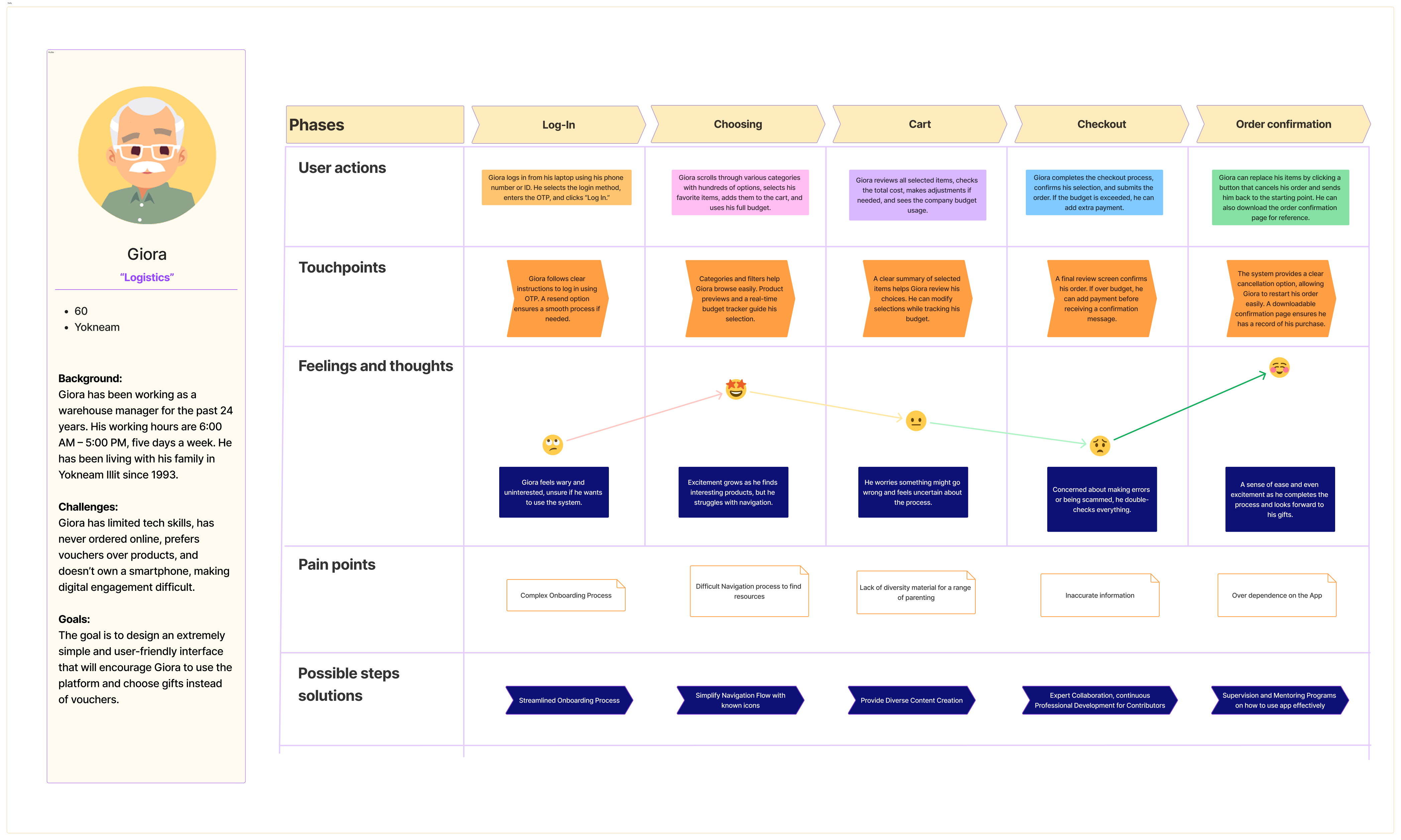
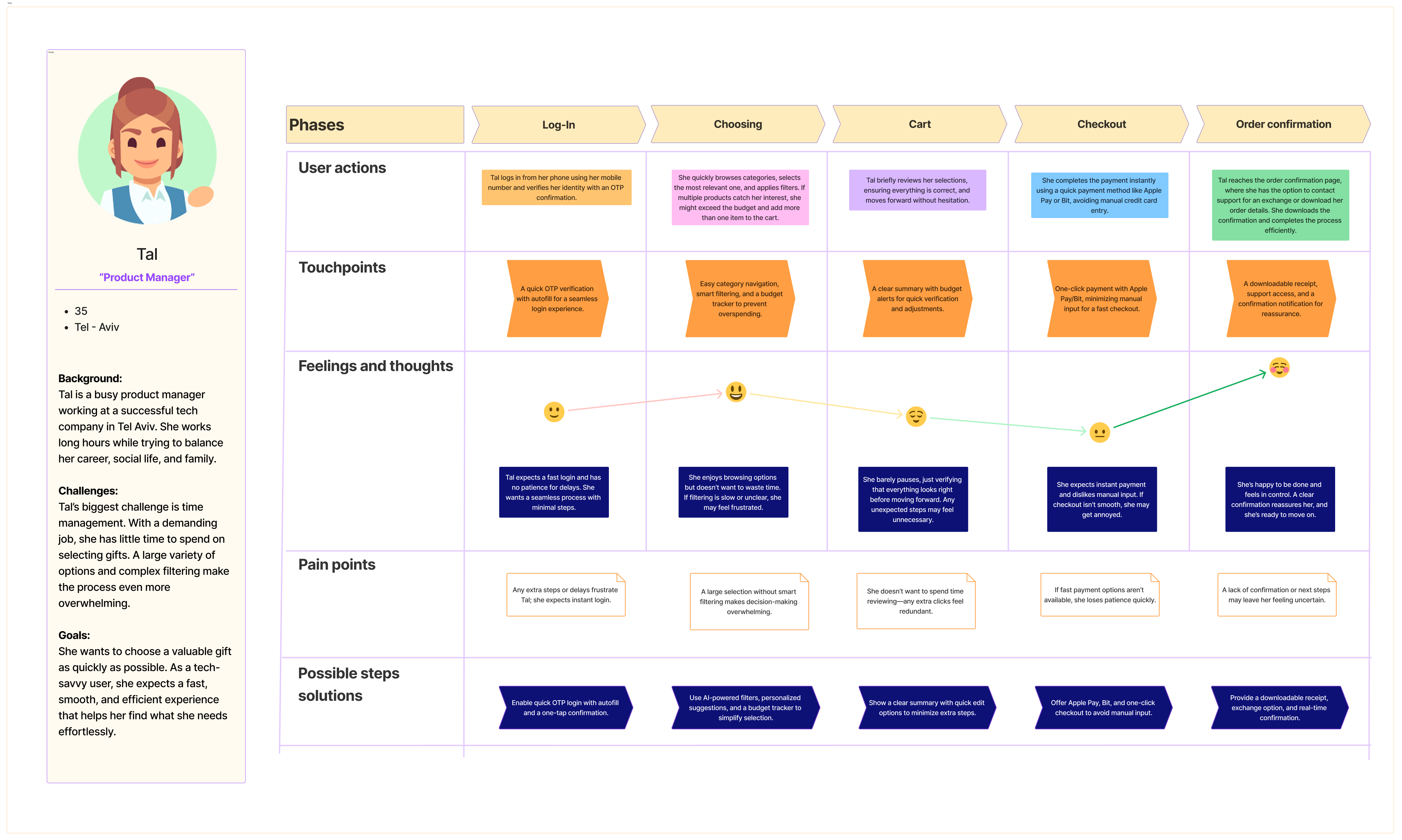
Our target audience is divided into two different user types:
To ensure a seamless user experience, we focused on two distinct user personas with very different digital behaviors:

👩‍💻 Tech-Savvy Employee (Age 35, High-Tech Industry)

  • Comfortable with e-commerce platforms and online purchasing.
  • Provided insights on streamlining navigation and optimizing the selection process.
  • Helped shape a modern, efficient UX with advanced filtering and sorting options.

👷 Non-Tech Employee (Age 48-63, Low-Tech Industry)

  • Less familiar with online shopping and digital platforms.
  • Faced challenges in navigation and required a more guided, intuitive user experience.
  • Helped us identify areas where simplicity and accessibility were crucial.

Given the broad range of users, our goal was to design a highly intuitive and inclusive platform that caters to both digital natives and users with minimal technological experience.

Internal System Research

Beyond the user-facing experience, we also conducted research to enhance the internal operational side of the platform. We interviewed sales representatives and customer success managers, gathering insights into their daily workflow, pain points, and efficiency challenges.

Key objectives:
1. Identify inefficiencies in current workflows.
2. Streamline internal processes to save time and resources.
3. Enhance usability for internal employees managing client accounts.

By addressing these challenges, we aimed to reduce workload, improve productivity, and enhance overall employee satisfaction, ultimately making the platform more scalable and efficient.

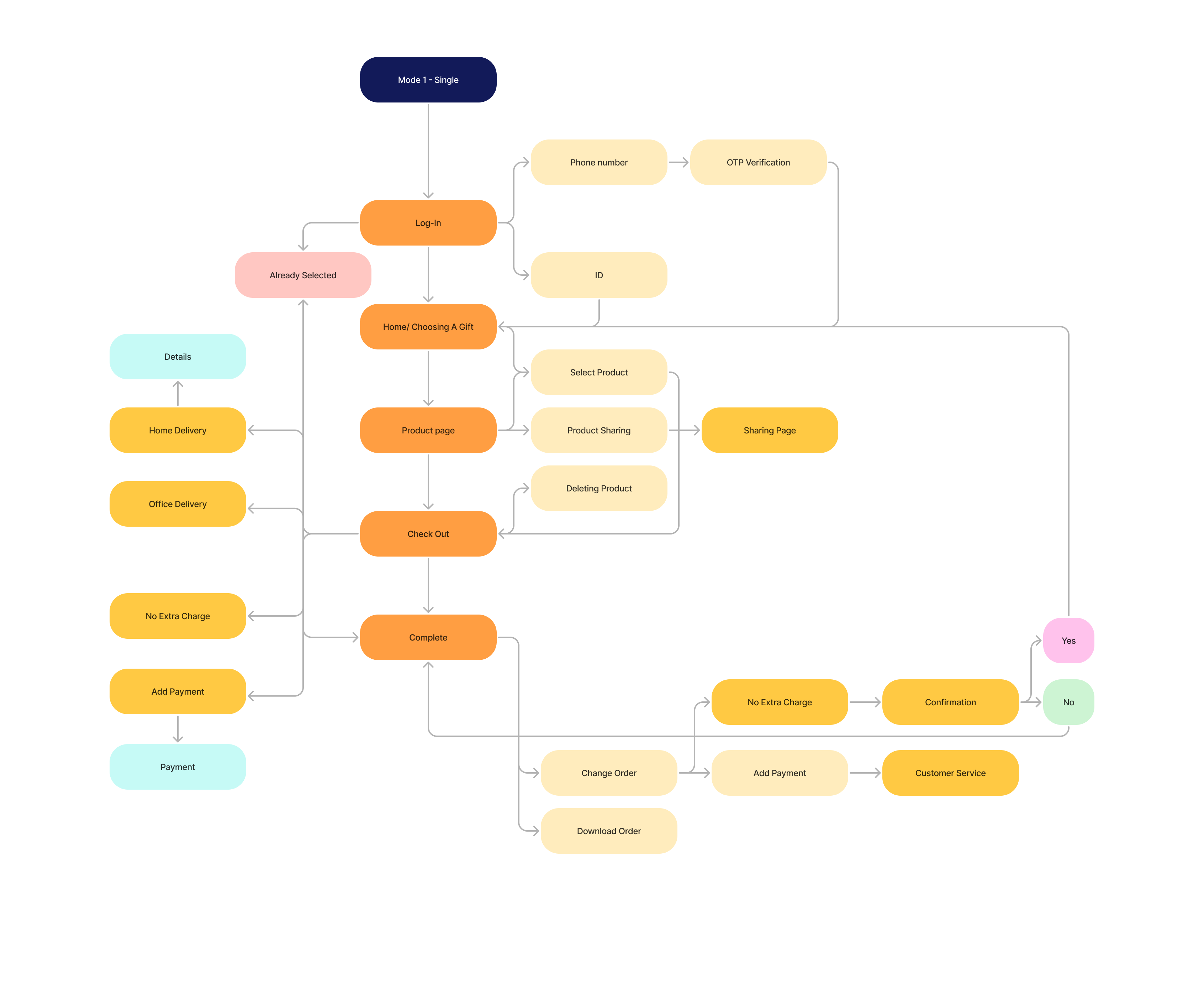
User Flow

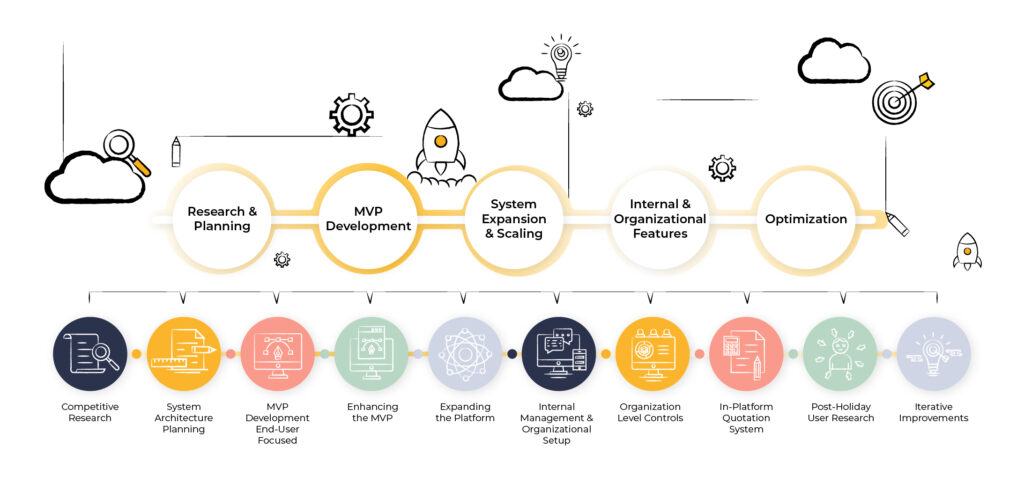
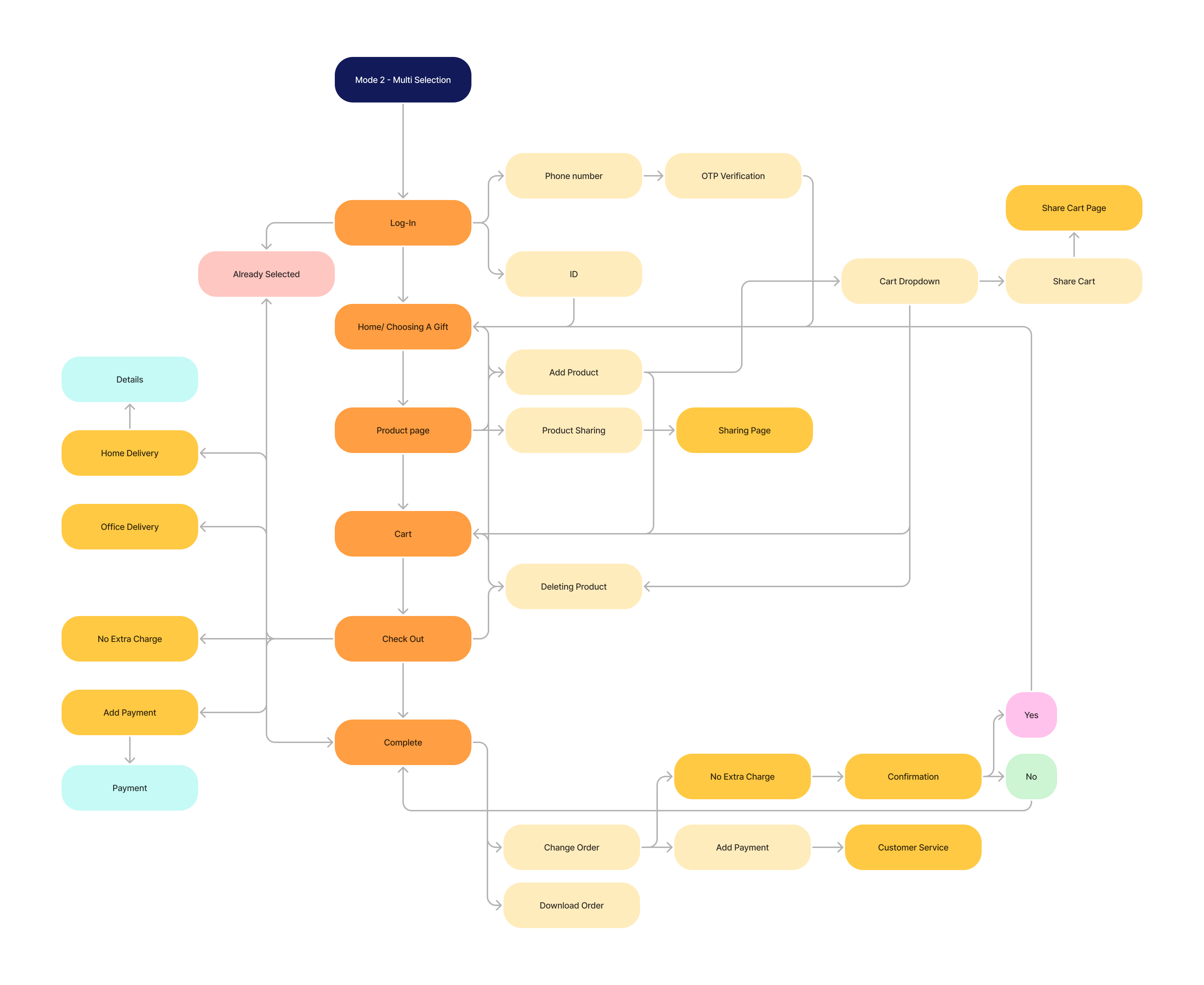
After mapping out the full platform flow, we decided to focus our initial release (MVP) exclusively on the end-user experience.
The goal was to develop a simple and intuitive version that would allow employees to seamlessly select their gifts, ensuring a smooth user experience. This approach enabled the company to launch quickly without delays, allowing organizations to start using the platform while additional features were being developed.
By prioritizing the core functionality for employees first, we ensured that the gifting process was efficient, user-friendly, and ready for immediate adoption.

Mode 1 - Single

Mode 2 - Multi Selection

Expending The Platform

After the initial MVP release, we expanded the employee gifting experience with additional features to enhance flexibility and improve user engagement.

1. Multi-Item Selection
We designed an intuitive multi-item selection flow, allowing employees to build a personalized gift bundle instead of choosing just one item. Optimized browsing, filtering, and selection UX led to an increase to 2.4 gifts per user, a 7% drop in voucher selection, and a 25% revenue boost per user.

2. “Money Product” (Gift Voucher Integration)
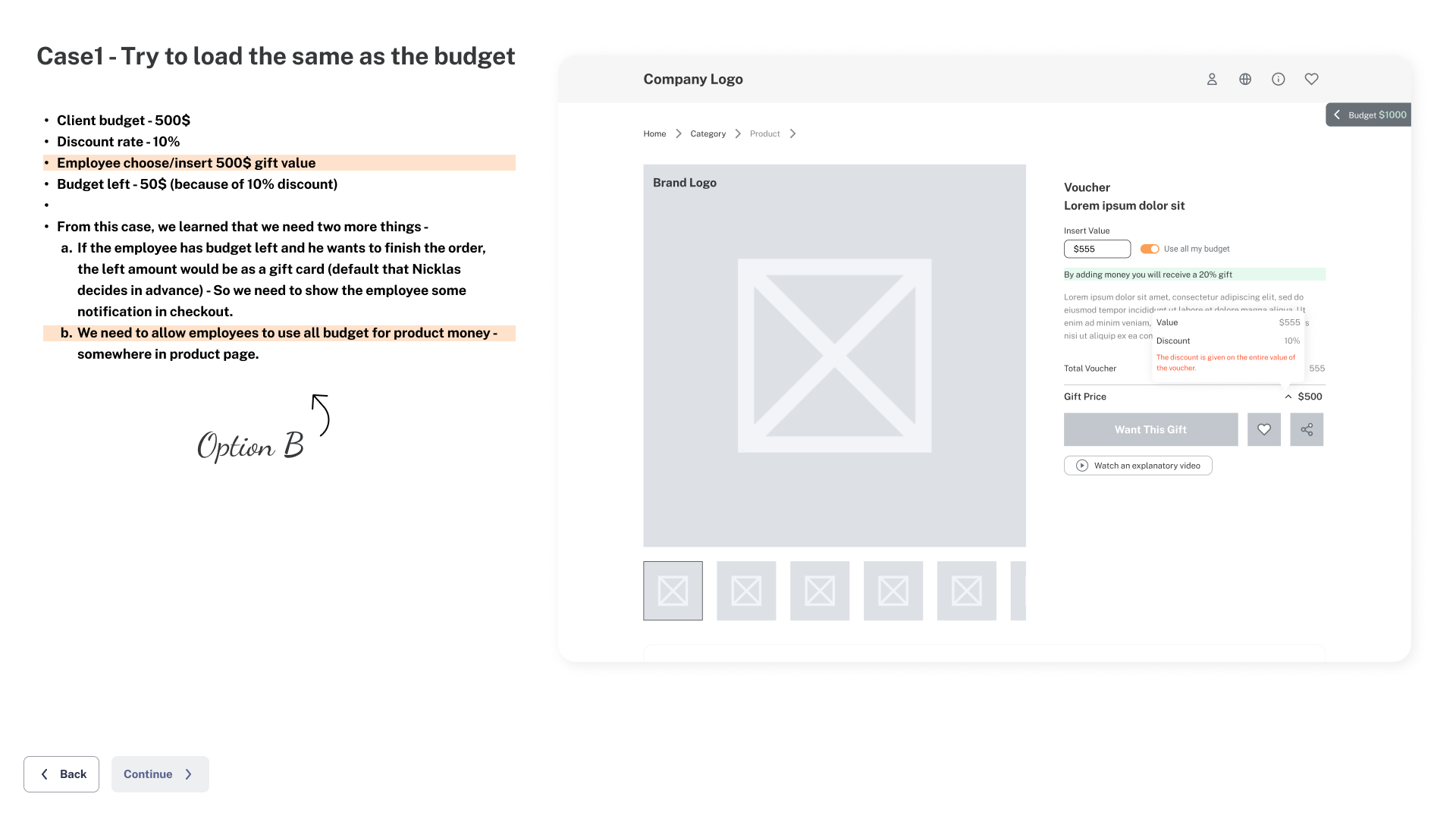
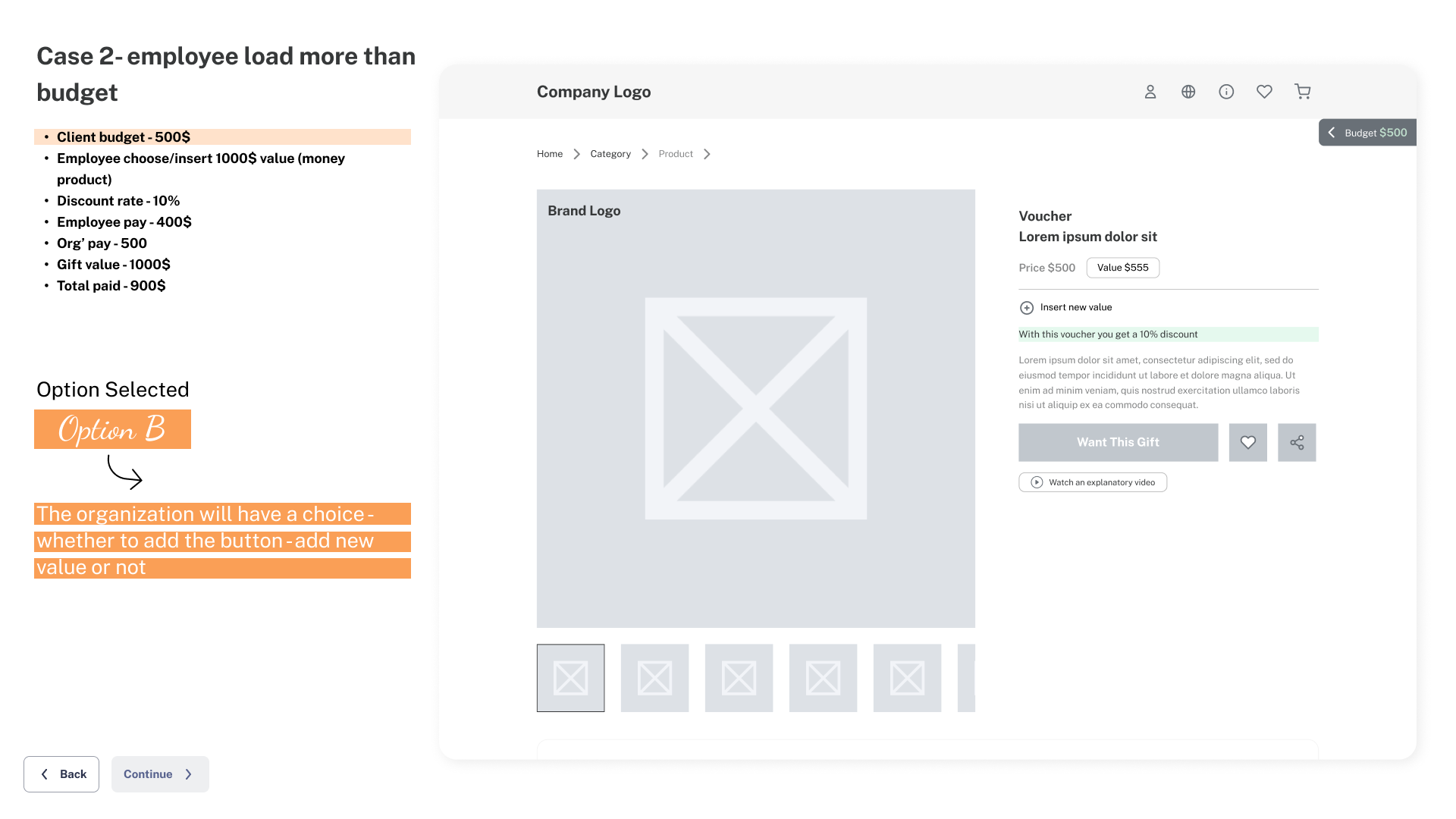
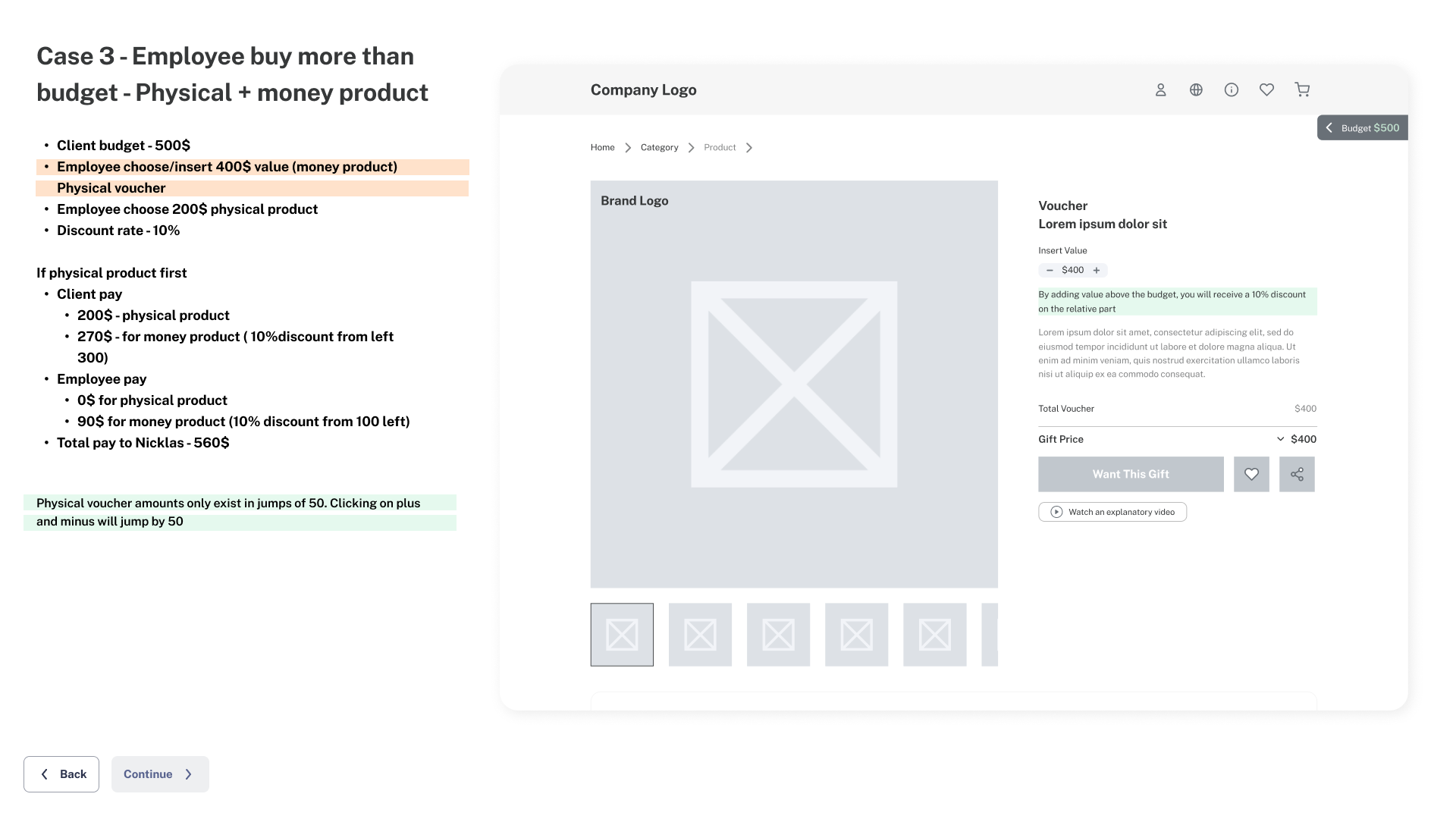
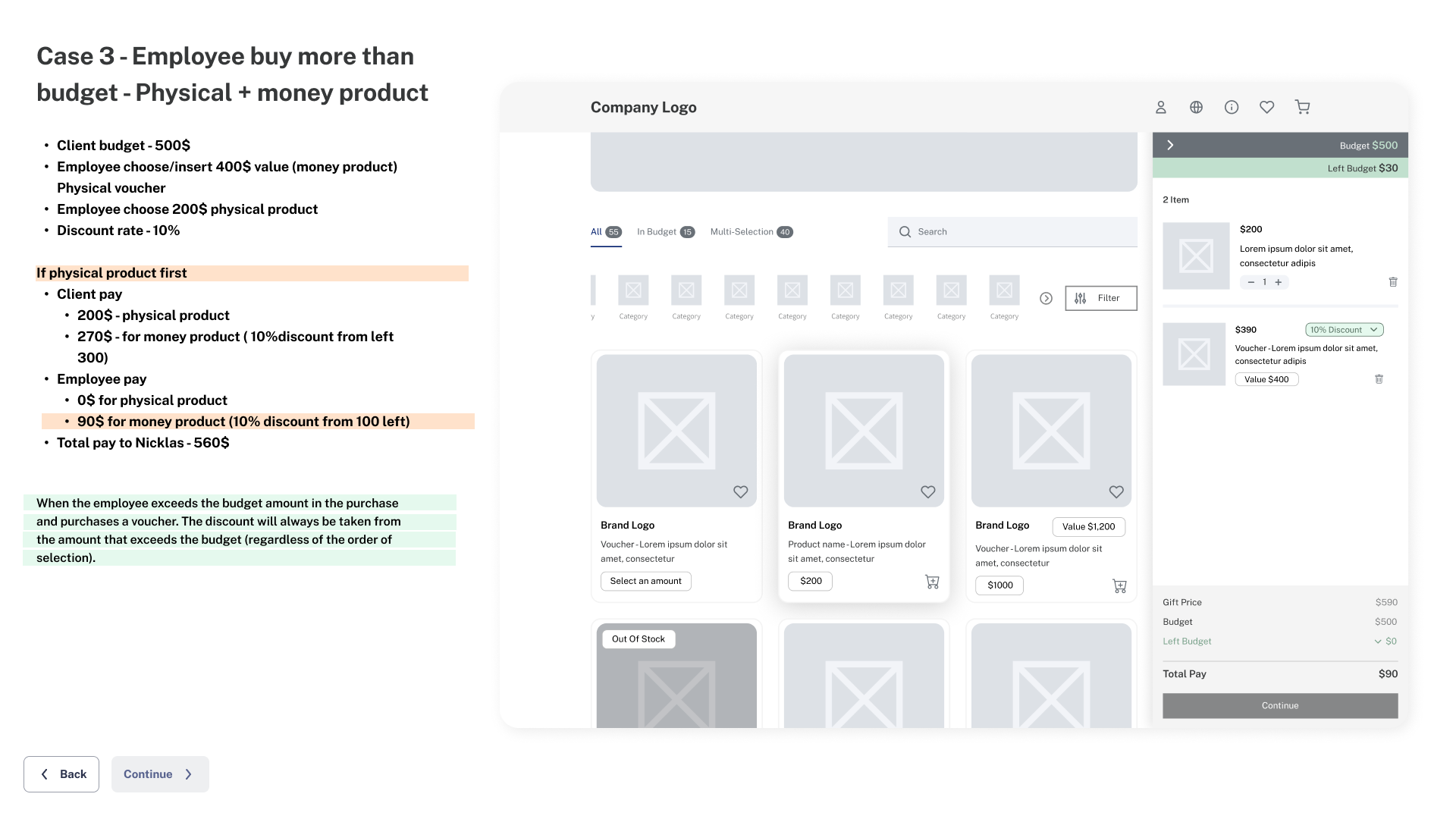
The customizable gift voucher introduced complex interactions, requiring 17 wireframed UX edge cases to define pricing logic, discount handling, and user flows. Smart validations and clear UI design ensured a seamless experience, balancing user flexibility and platform efficiency.

Challenges & Solutions

One of the biggest UX challenges was merging two purchasing models—physical gifts and digital vouchers—into a single, seamless experience. Since this was a new concept in the market, we had to educate users on how to manage their budget dynamically.

Solutions Implemented:
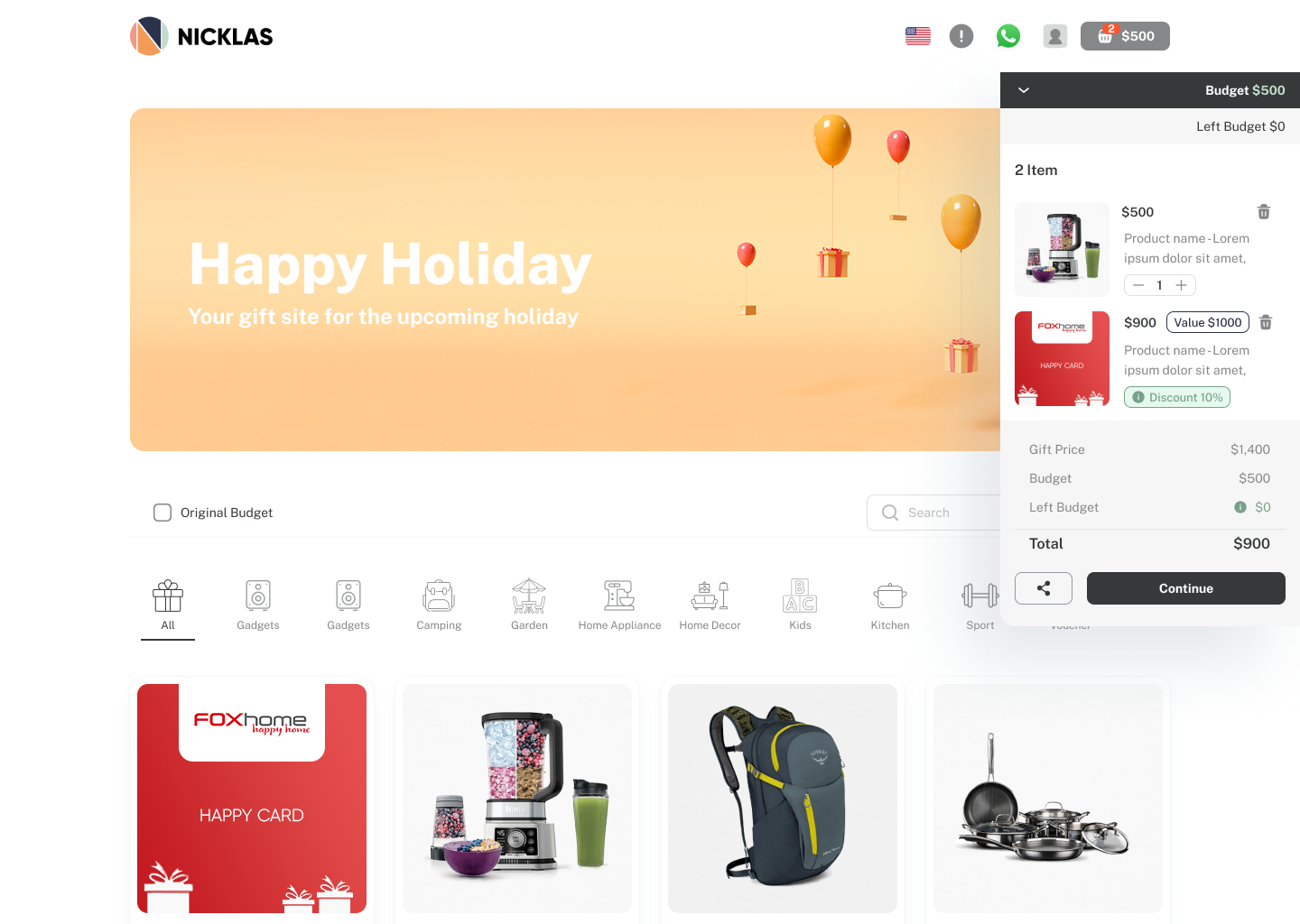
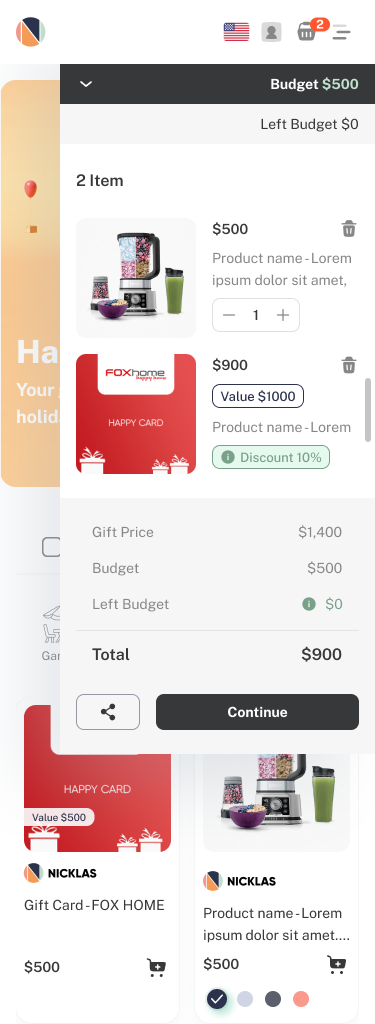
Persistent Shopping Cart – The cart follows the user throughout their selection process, allowing them to add/remove items while seeing real-time budget updates.
Visible Budget Tracker – Employees always see their remaining budget at a glance.
Clear Budget Breakdown – A dedicated row displays the total cost of selected gifts separately from the remaining budget.
Voucher Discounts Display – Ensuring users see applicable discounts directly in their cart.
Quick Add/Remove Functionality – Users can adjust quantities and remove items directly from the floating cart interface for a smooth experience.
This phase marked a significant shift in how employees interact with corporate gifting, as we introduced a new purchasing behavior that was not standard in the market—essentially shaping a new industry norm.

Enhancing Internal Workflow

After successfully launching the employee-facing gift selection platform, we shifted our focus to optimizing the internal company system to improve operational efficiency.

Initial Development Approach

The internal system was built around functional workflows without structured UX/UI design in the early development phase. The focus was on rapid deployment, ensuring the company could operate even as the MVP was still evolving.

Optimizing the Campaign Creation Process – UX Impact

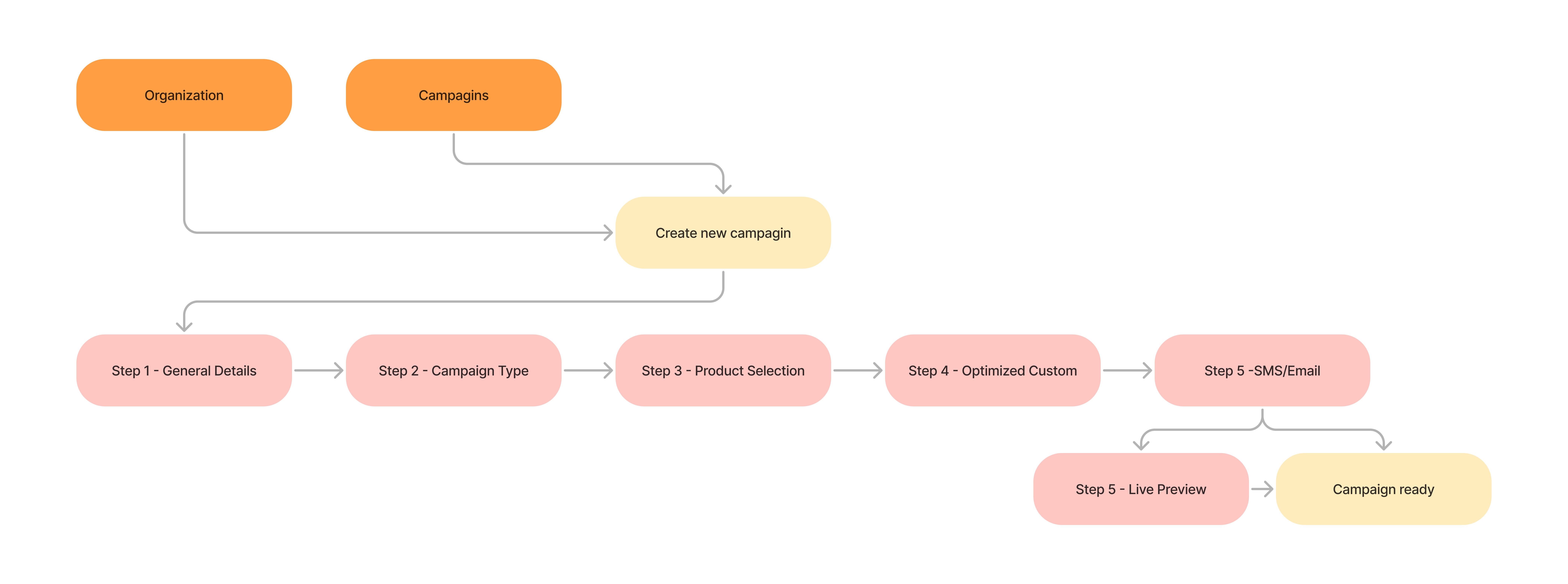
For my case study, I focused on the campaign creation process, a long and complex UX flow that directly impacts operational efficiency and workforce demands. Refining the interaction design, streamlining steps, and optimizing the user journey reduced campaign setup time by 75%, significantly improving productivity and scalability.

UX Solutions

As part of the campaign setup process, we tackled three critical UX challenges to enhance usability and efficiency:

1.  Step 3: Product Selection – Ensuring seamless selection, quick pricing adjustments, and category customizations.
2. Step 4: Design Customization – Improving the experience of customizing the campaign’s visual elements.
3. Step 5: Link & Notifications (Email & SMS) – Streamlining communication settings for employees receiving the campaign link.

Each stage had its own UX challenges and solutions, as detailed below.

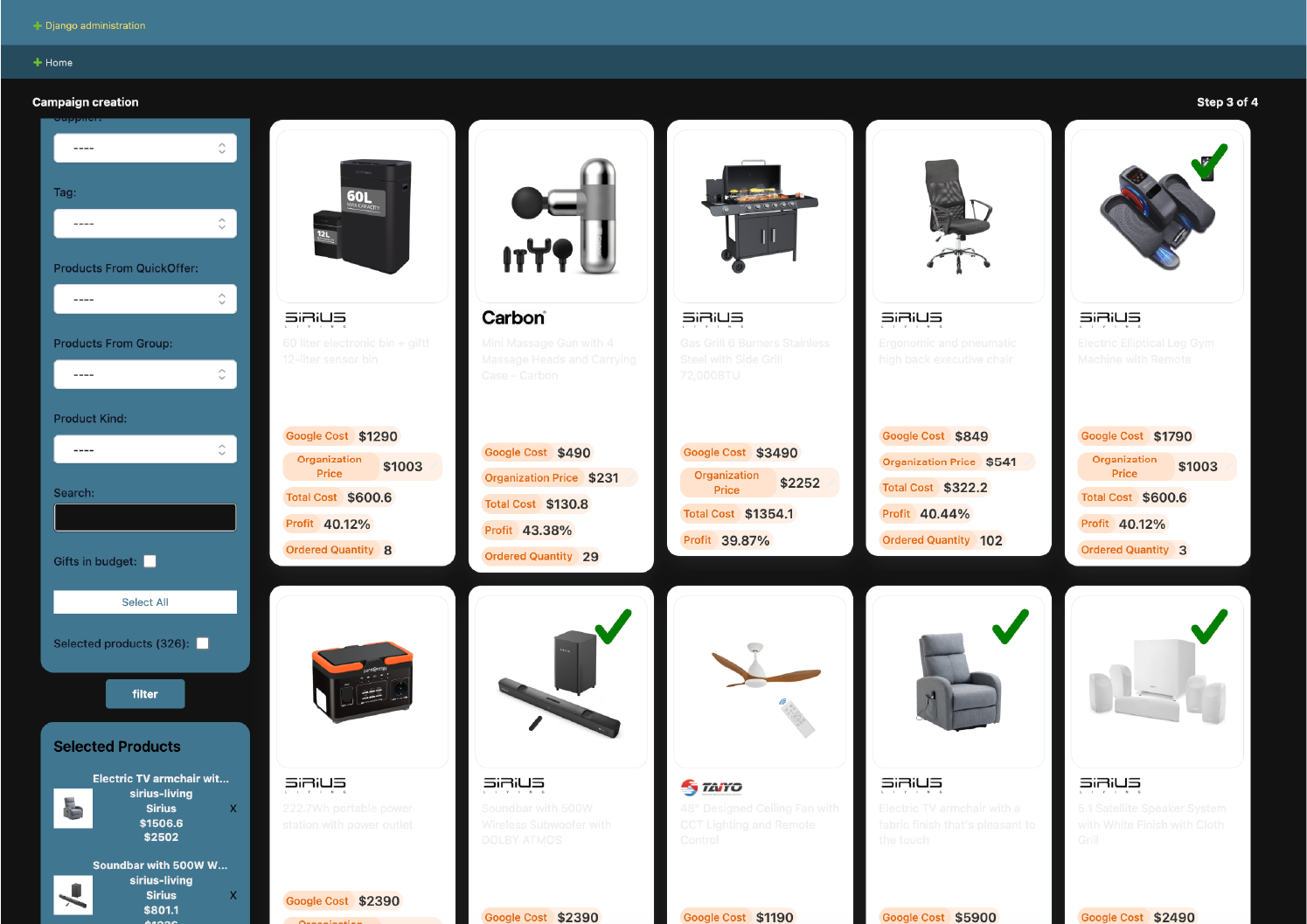
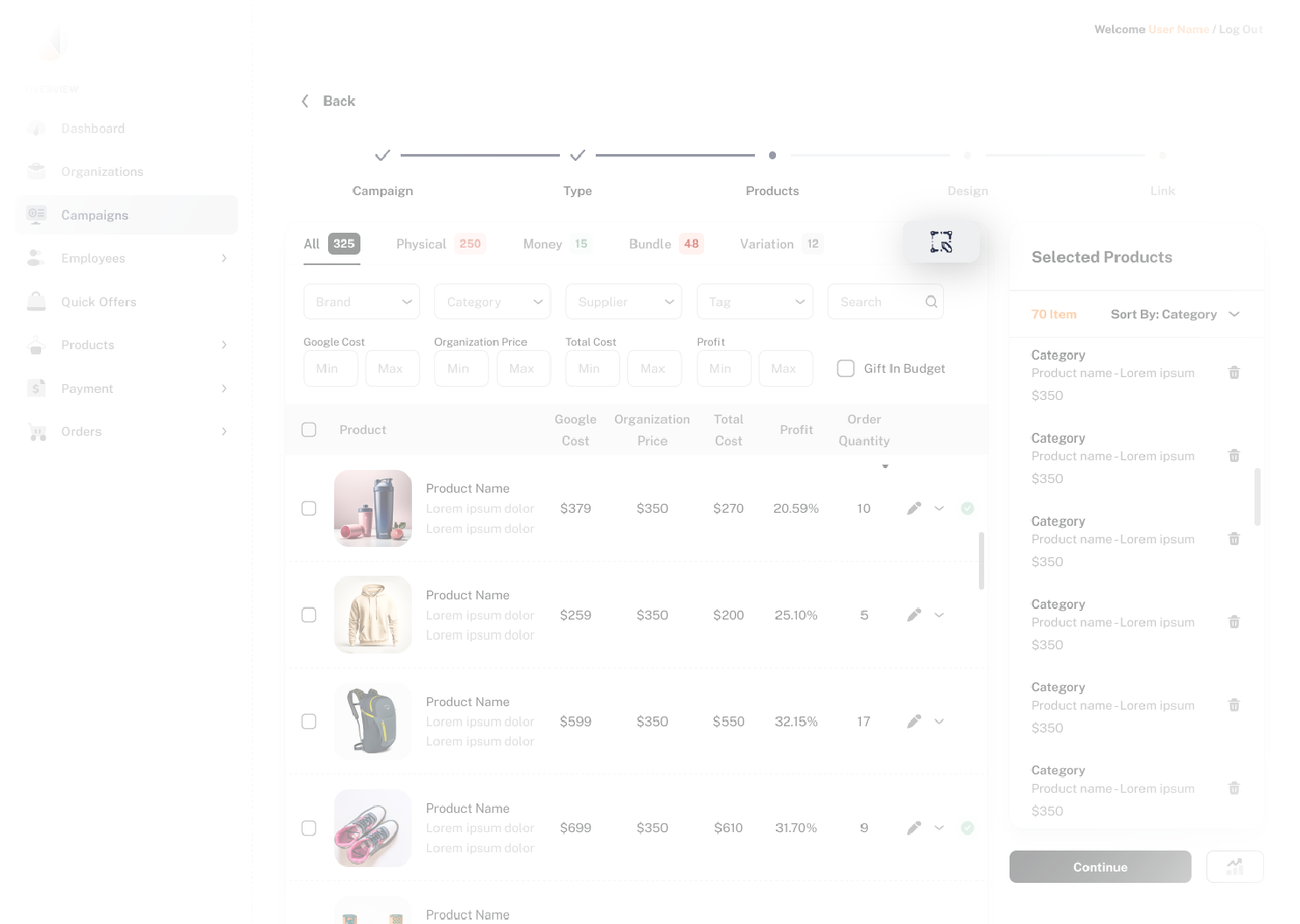
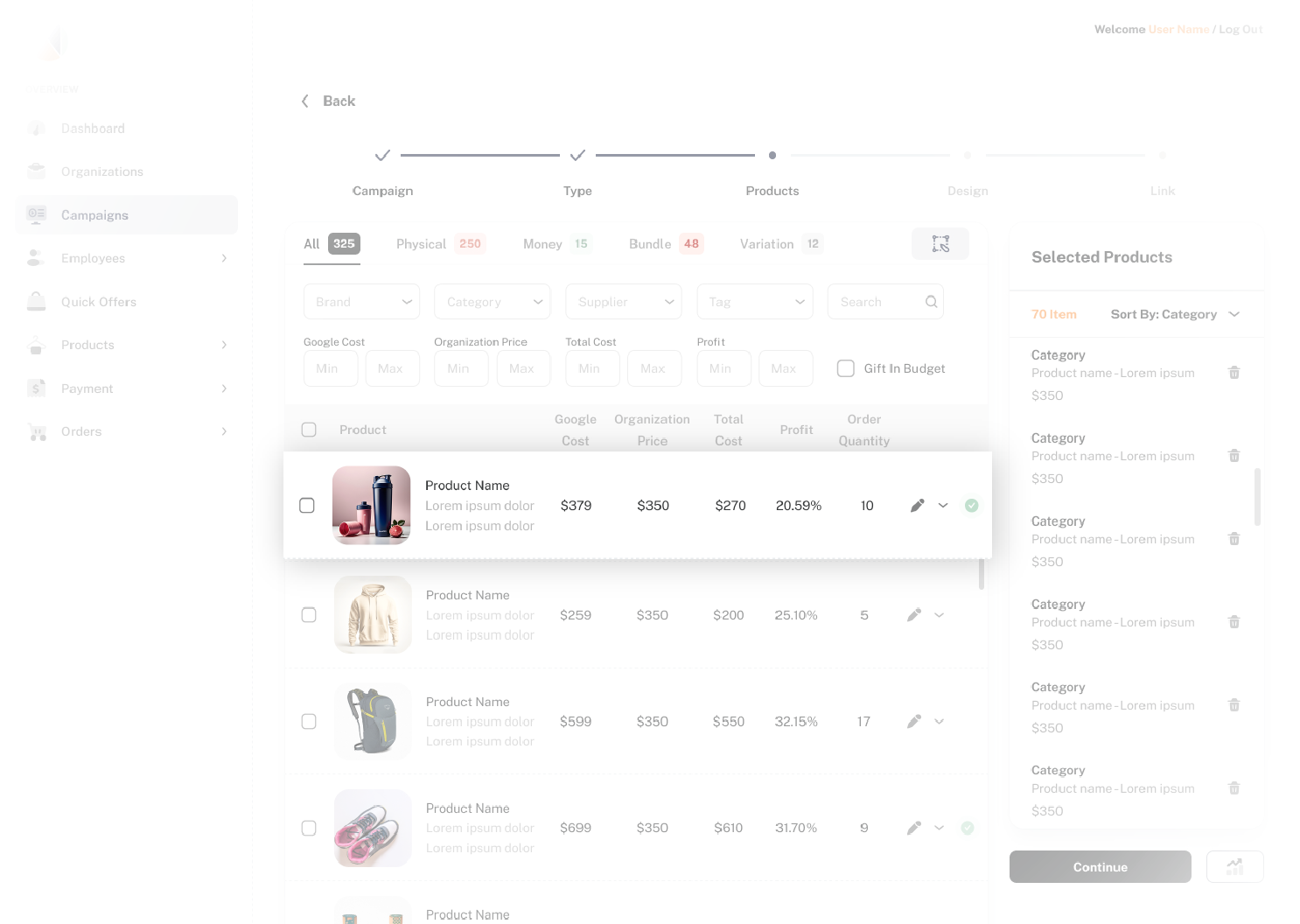
Step 3: Product Selection

Key UX Challenges:

* Efficient product selection – Users needed a fast and intuitive way to browse and select from a large product catalog.
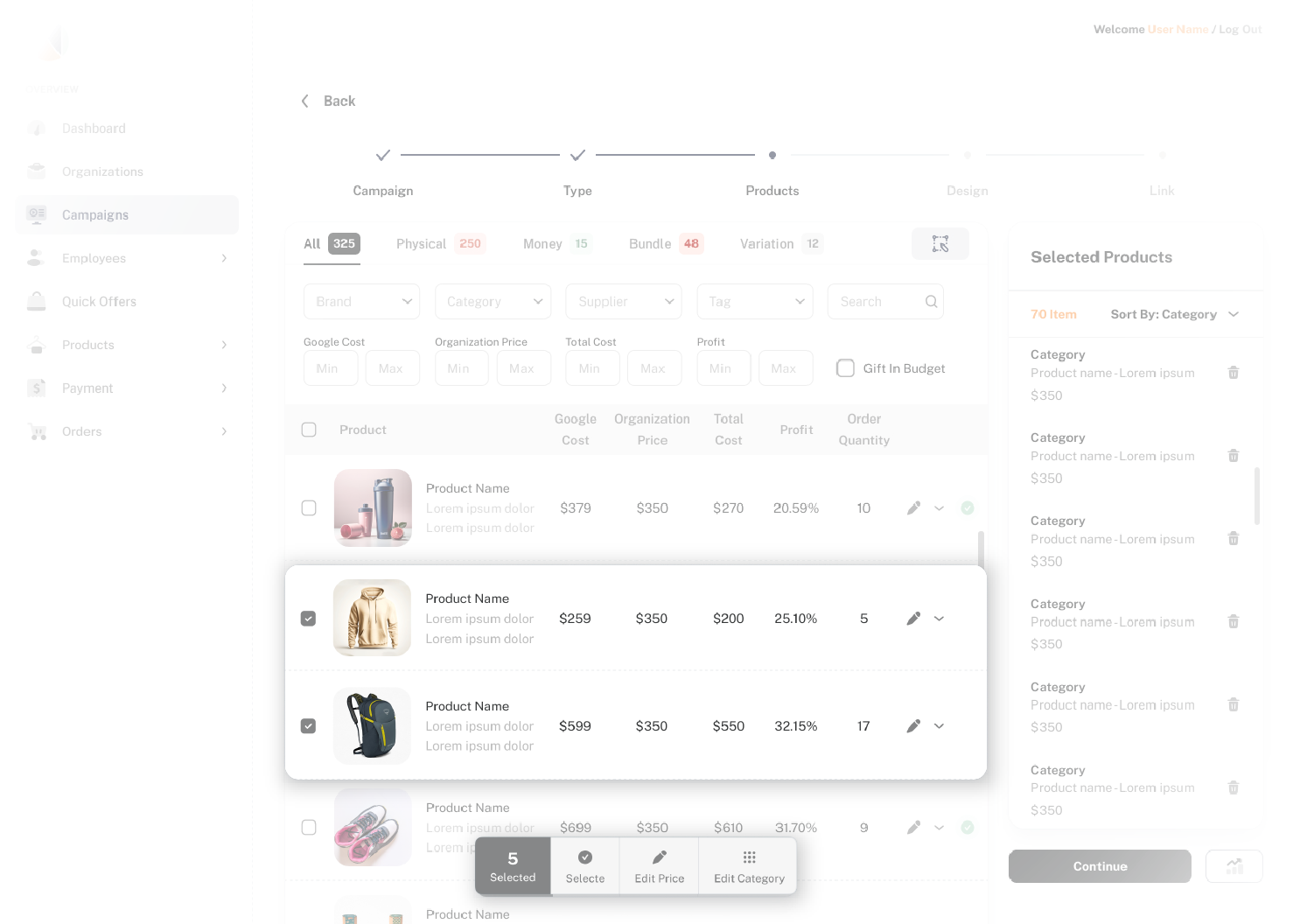
* Bulk price adjustments – Each company has a different budget per employee, which affects product pricing. Previously, prices had to be adjusted one by one, slowing down the workflow.
* Clear overview of selected products – No easy way to see, manage, or remove selected products.
* Custom product categories per company – Some companies required products to be categorized differently from the default system.

Before

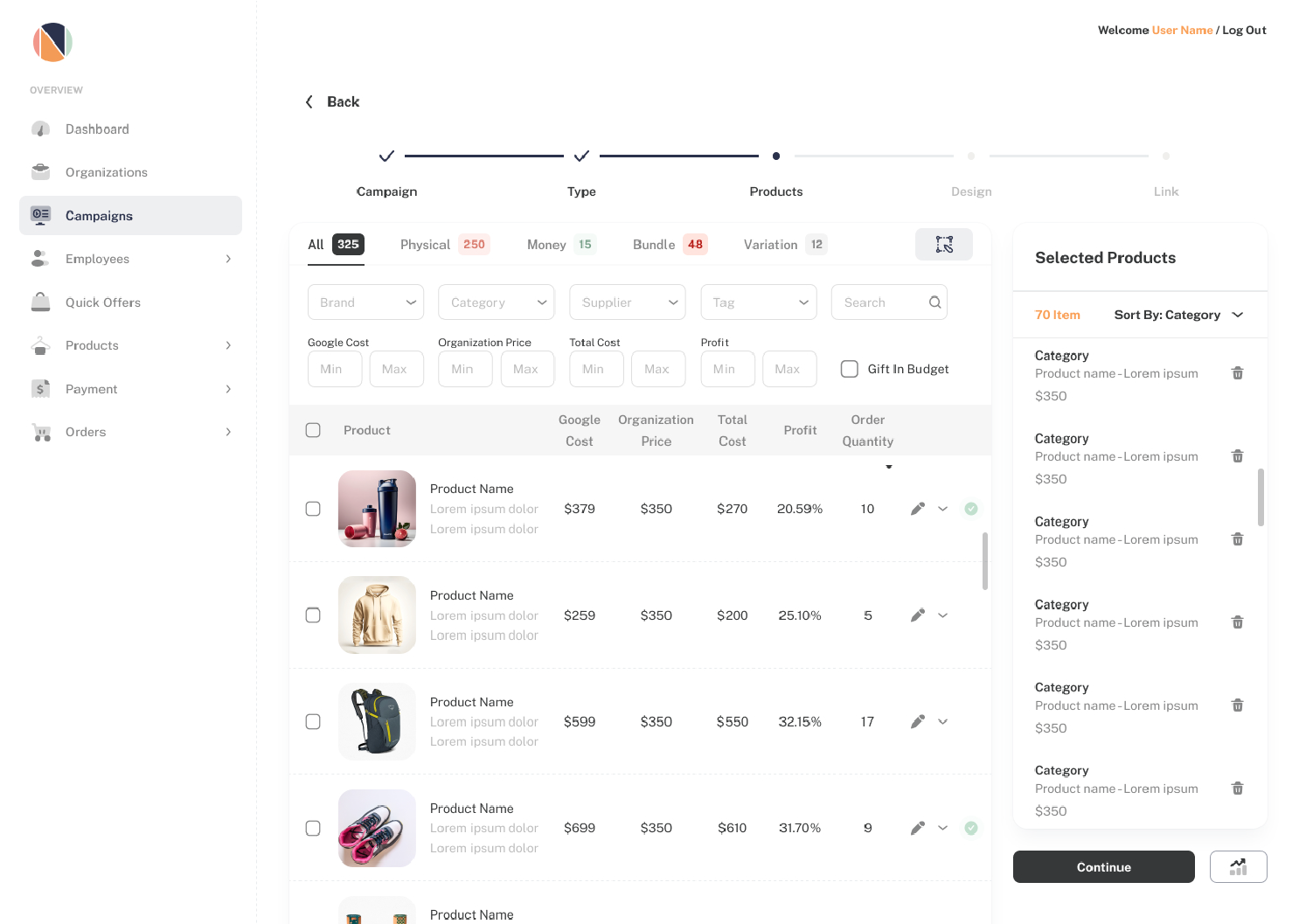
After

UX Solutions:

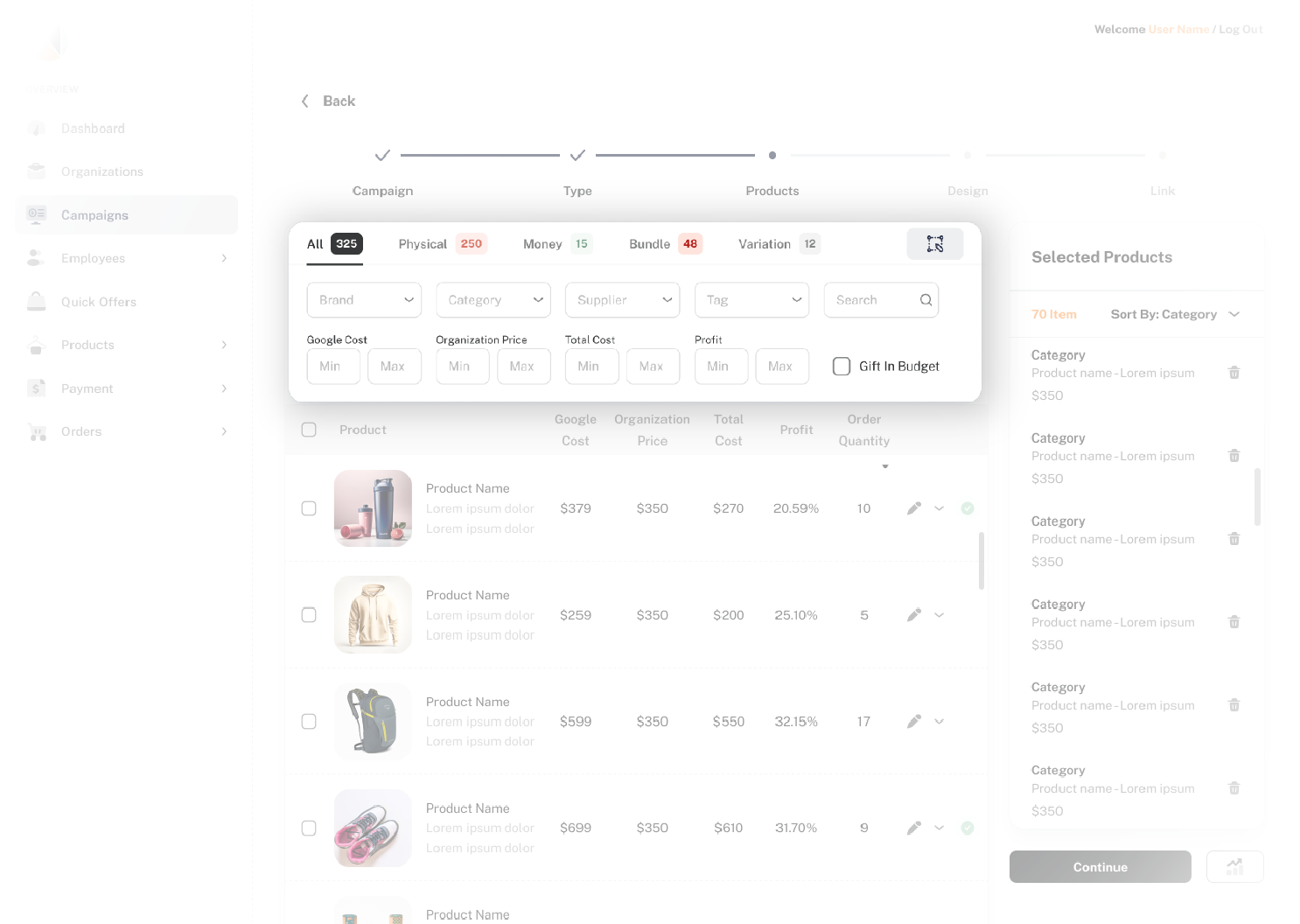
List-Based Selection & Smart Filtering

  • Switched to a compact list view to display key product details, allowing for a quick and structured selection process.
  • Added a sticky filter panel with multiple sorting options for better navigation.
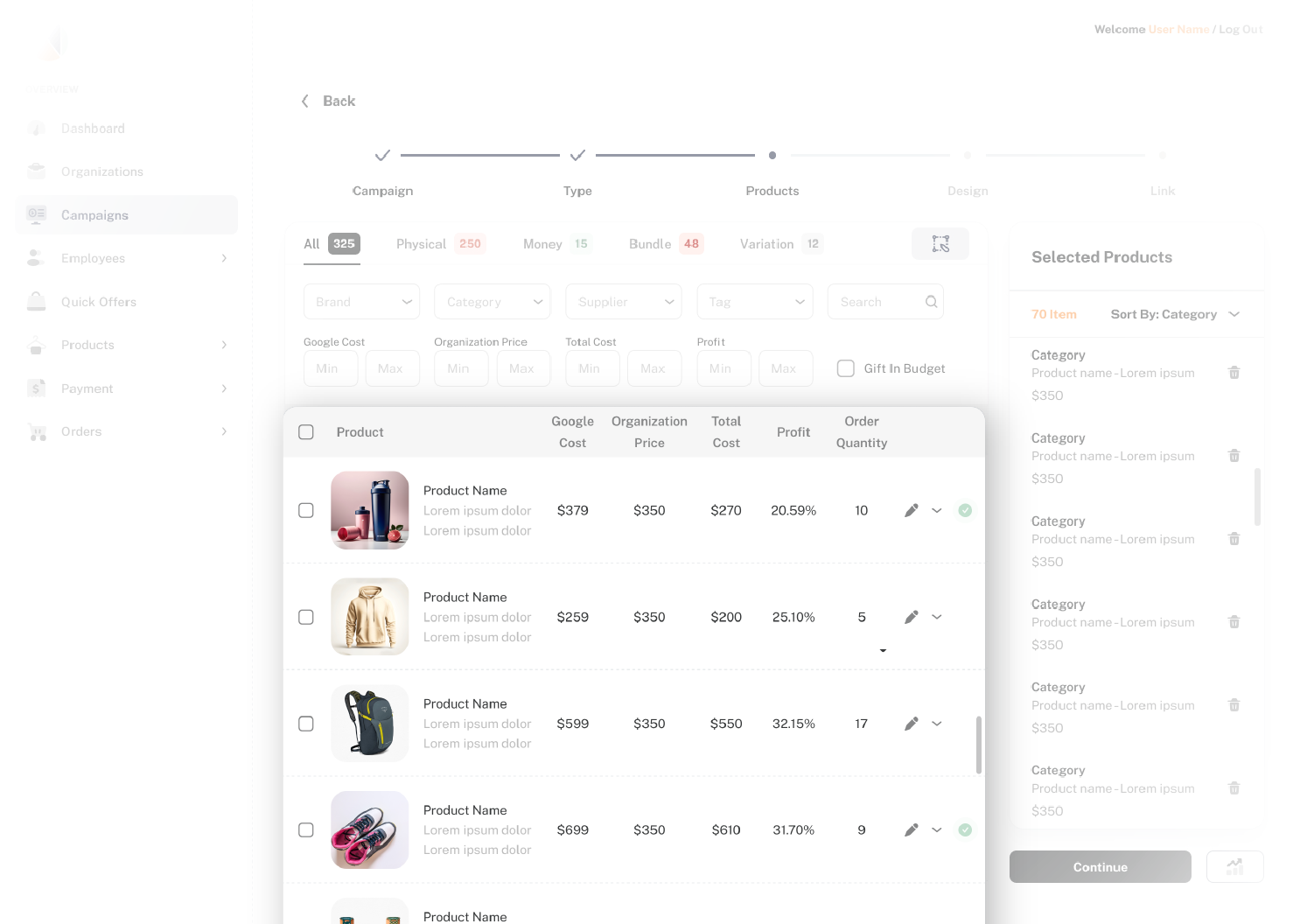
  • AI-Powered Product Recommendation – Introduced an AI-driven button that opens a pop-up with short questions to tailor product recommendations for each campaign, saving valuable time.

Bulk Price Editing Panel & Competitive Insights

  • Enabled group selection and a floating price panel, allowing users to adjust multiple products at once.
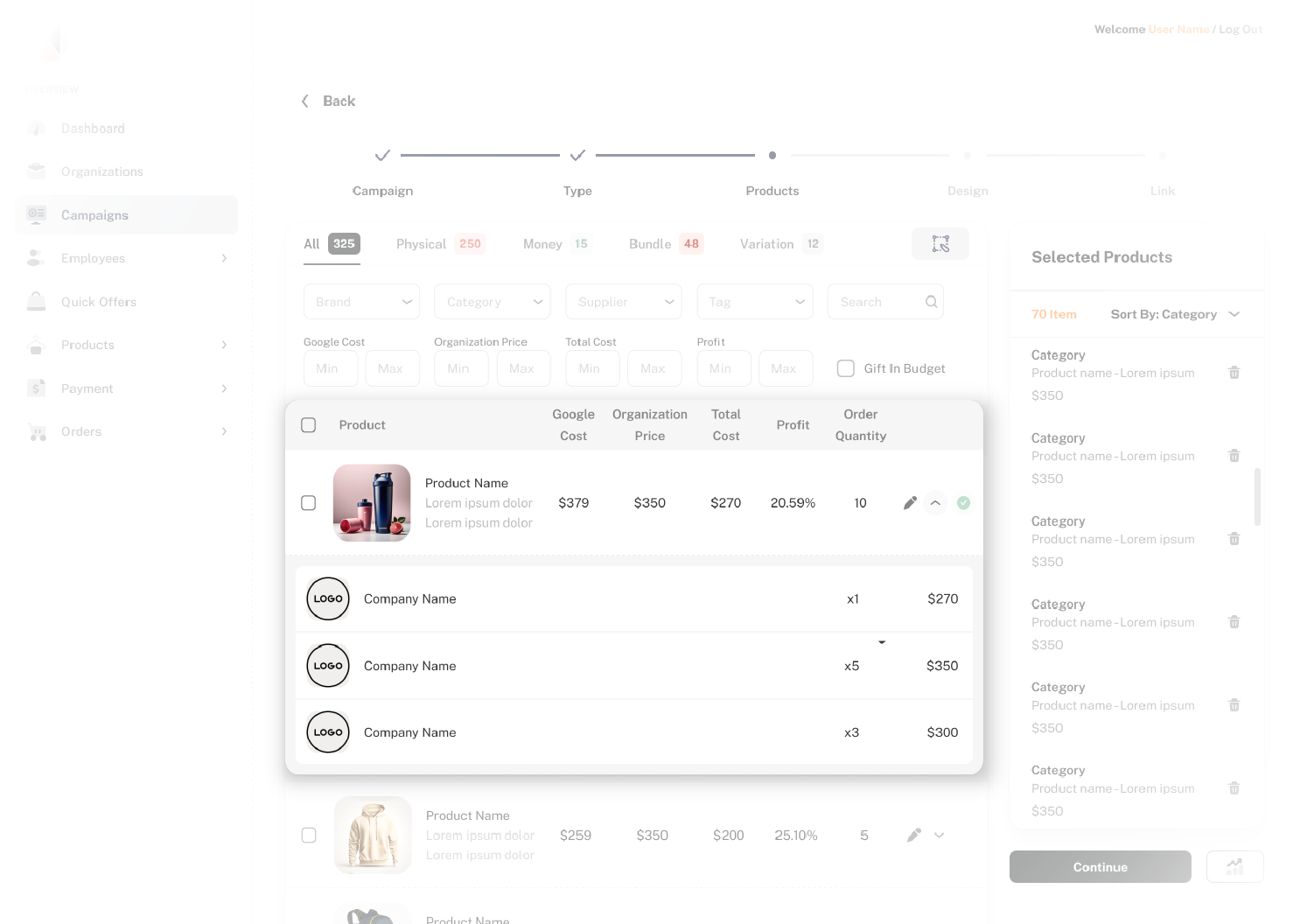
  • Demand & Pricing Insights – Added a small arrow icon next to each product that expands into a dropdown view, displaying:
    • Which companies have previously selected this product
    • How frequently it has been chosen
    • The price assigned to each company
  • This feature provides real-time data on product demand and pricing, allowing for better-informed decisions.

Sidebar for Selected Products & AI-Based Optimization

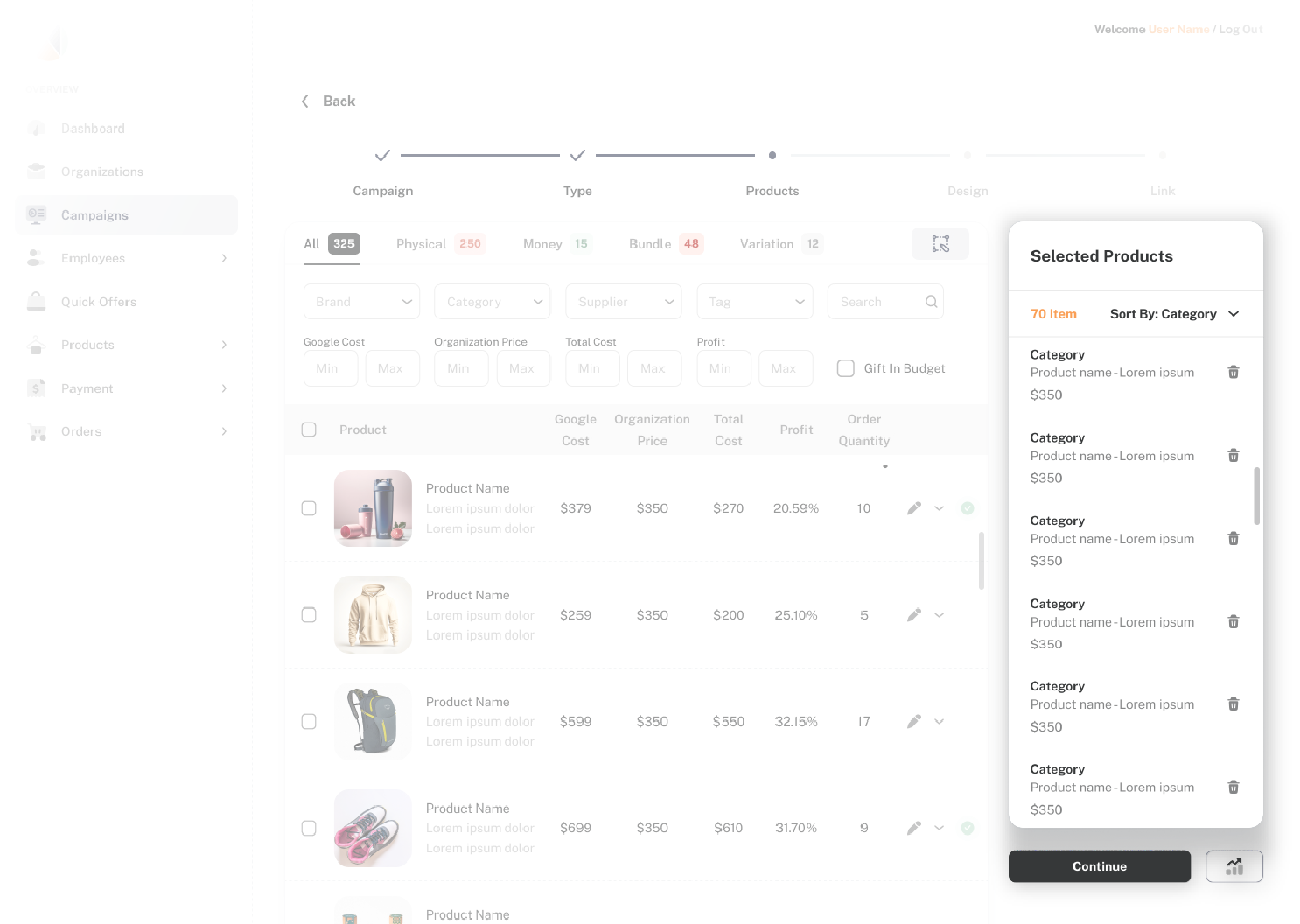
  • Created a side panel showing all added products with a trash icon for quick removal.
  • Products selected from the list are marked with a green checkmark, allowing for easy removal from either the list or the panel.
  • AI-Based Selection Ranking Tool
    • Added a ranking button below the product list that uses AI to analyze the distribution of selected gifts across categories, price ranges, and product types.
    • Provides real-time suggestions to ensure a balanced selection, helping users avoid missing key products.
    • Reduces the need for back-and-forth communication with clients, ensuring an optimized gift selection.

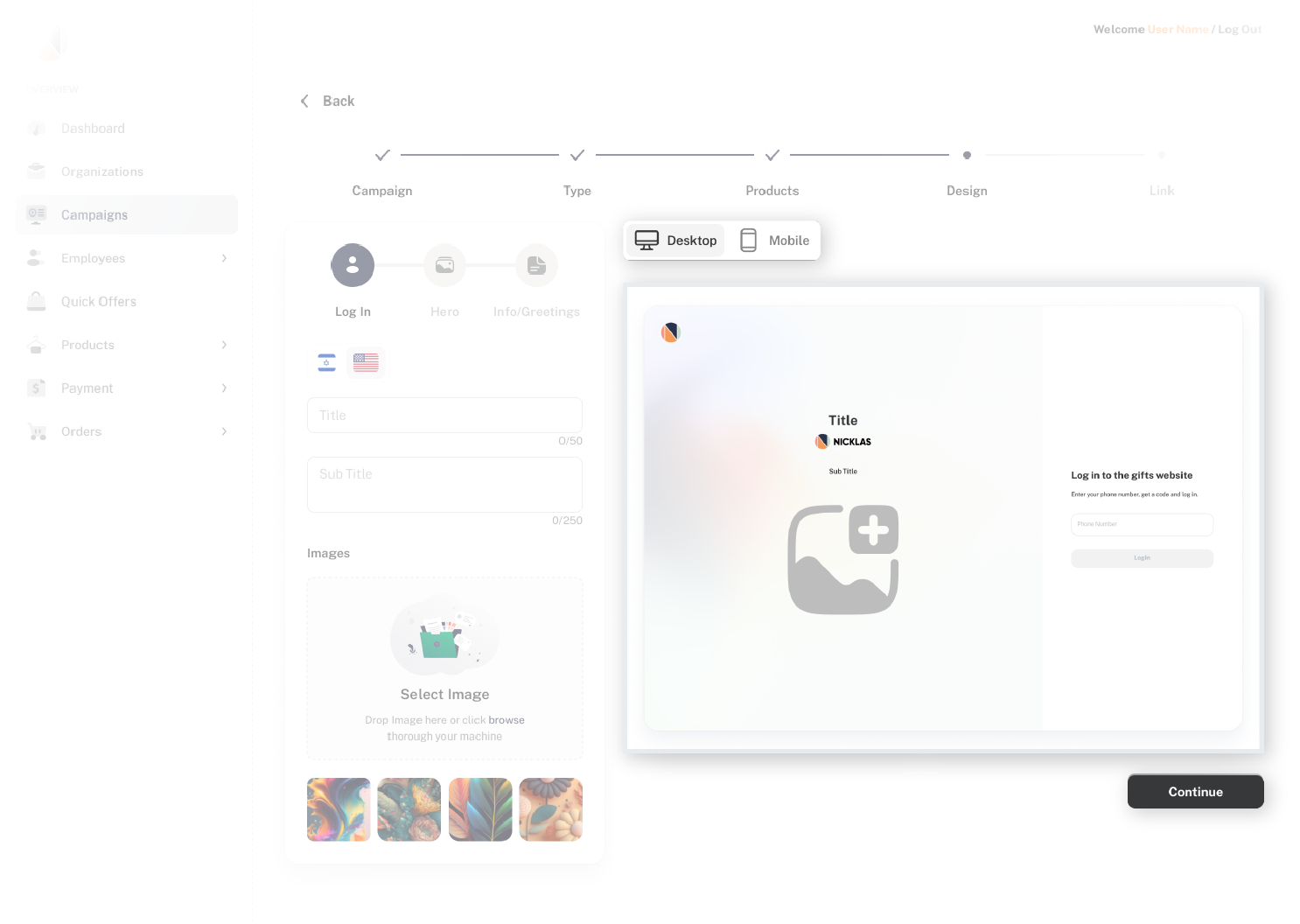
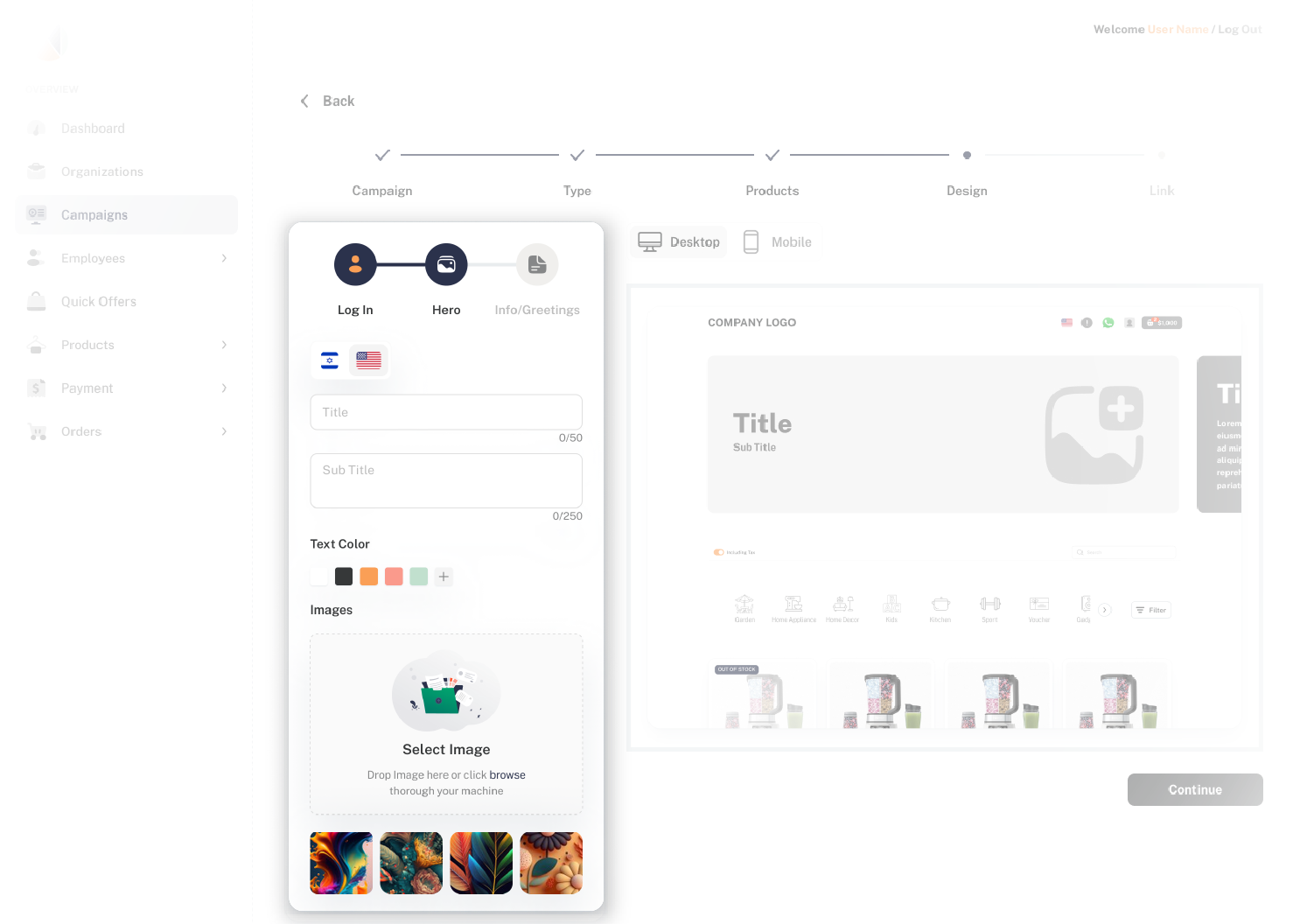
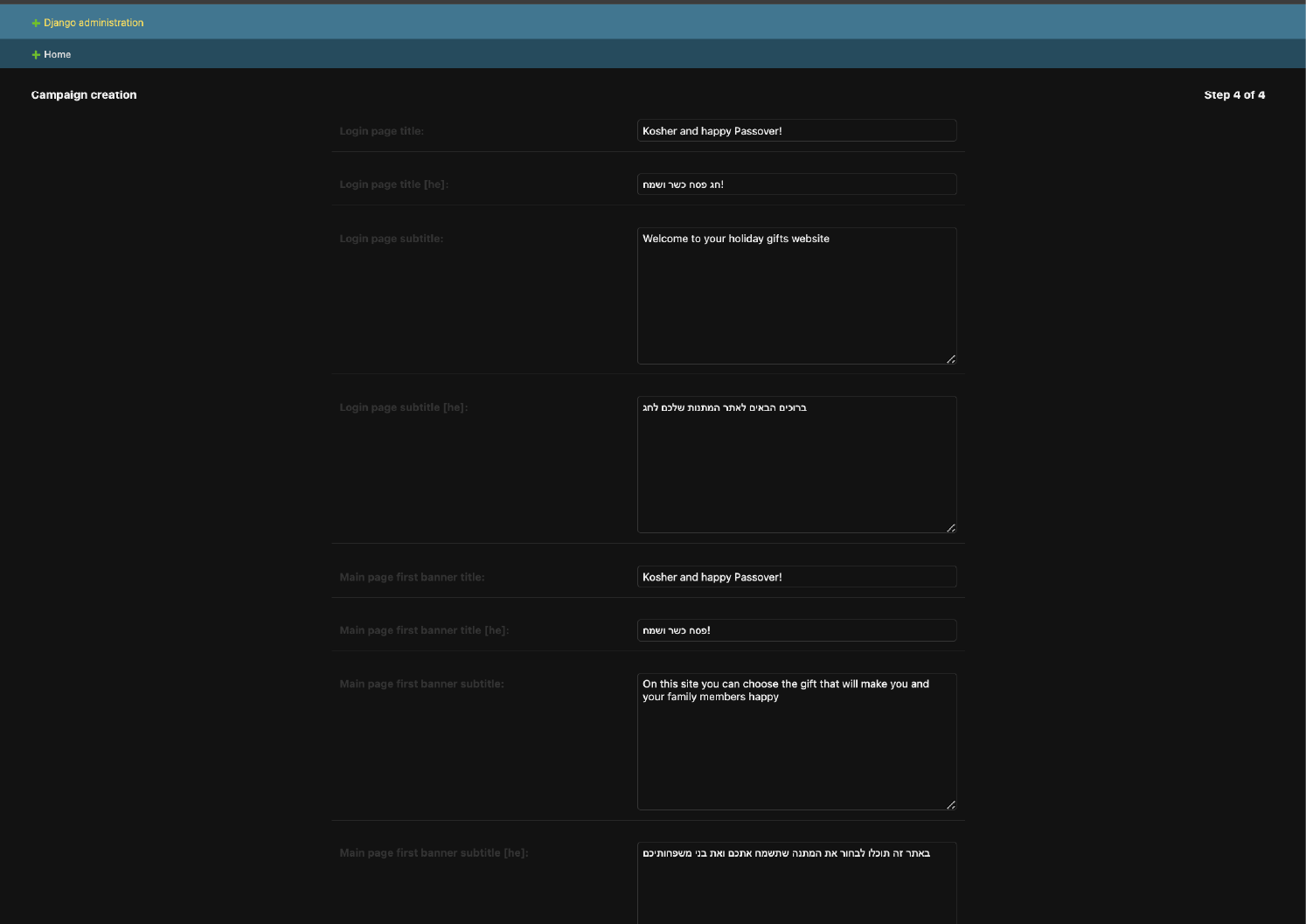
Step 4: Design Customization

Key UX Challenges:

* Difficult hero image upload – No streamlined method for managing visual assets.
* No live preview – Users had to work blindly and check results only after finalizing the campaign.
* Multilingual text input issues – No intuitive way to switch between Hebrew and English text fields.
* Lack of clear design flow – No structured way to navigate between design elements (hero image, text, and colors).
* No dynamic text color adjustments – Users couldn’t modify text colors based on the background image for better readability.

Before

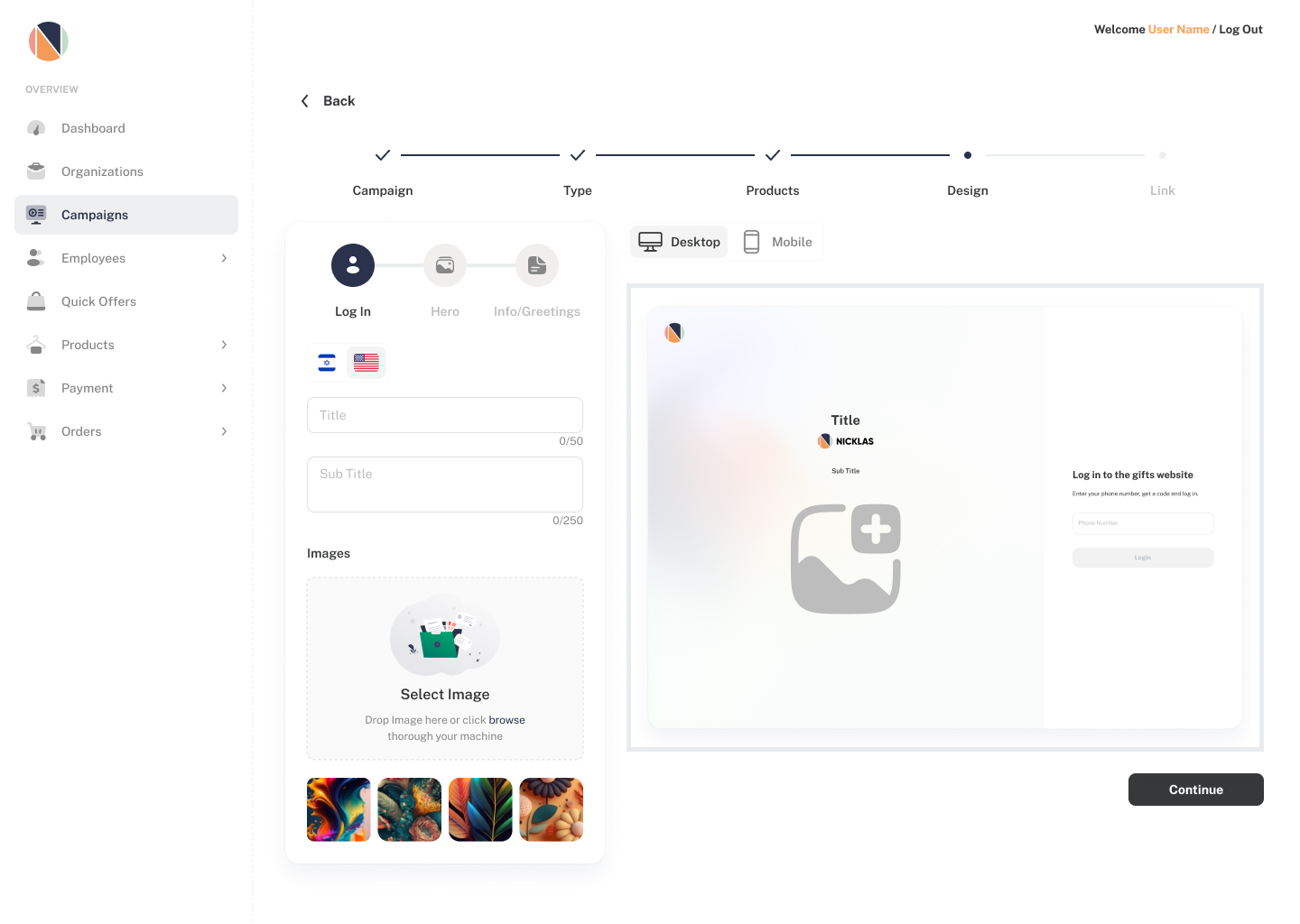
After

UX Solutions:

Image Gallery & Upload Options

  • Provided pre-existing templates and an upload option for custom branding.

Live Preview Panel

  • Added a real-time preview panel next to the editor, allowing users to see changes instantly, reducing back-and-forth adjustments.

Multilingual Tabs

  • Introduced a language switcher above the text editor, enabling users to easily input content in different languages.

Step-Based Navigation

  • Created a three-step navigation bar to ensure all design elements are completed in a logical order.

Dynamic Text Color Adjustment

  • Added an inline color picker, allowing users to adjust text color based on the background contrast.

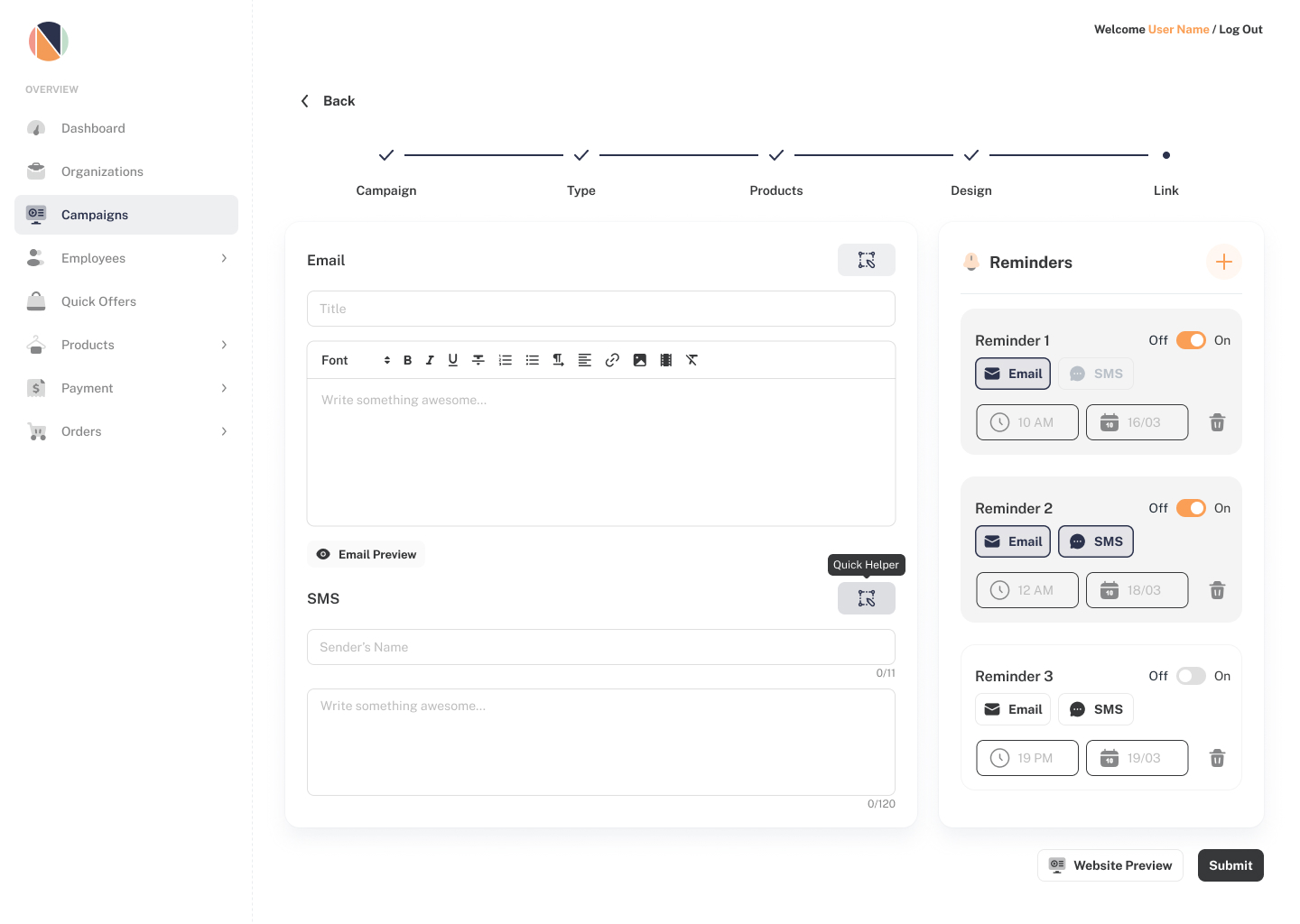
Step 5: Link & Notifications

UX Solutions:

* No character limit for SMS messages – Risk of exceeding message length and sending multiple unintended texts.
* No email preview – Users couldn’t see how emails appeared before sending them.
* No scheduling & reminder flexibility – Users couldn’t send custom reminders at different times and with varying messages.

UX Solutions:

Character Counter for SMS

  • Implemented a live character count to prevent unnecessary multi-message sends.

Email Preview Button

  • Added a quick preview button next to the email editor for instant visualization.

Reminder Scheduling Panel

  • Created a dedicated scheduling panel where users can:
    • Set date & time for multiple reminders.
    • Write custom messages for each reminder.
    • Choose between SMS, email, or both.
  • Toggle Switch for Reminders – Added an activation toggle to prevent accidental sends.
  • Validation for Required Fields – Prevented activation of reminders until all fields (message, time, and date) are completed, reducing errors.

Final Impact

🚀 More efficient campaign creation – Reduced the time required for product selection, design setup, and notifications.
🎨 Enhanced design flexibility – Provided intuitive customization tools for branding & multilingual support.
📩 Smarter notifications – Allowed for customized, scheduled communication with employees.

By implementing these UX improvements, we streamlined the entire campaign setup process, making it faster, more intuitive, and scalable for future expansions.

Final Thoughts

Designing the Nicklas  platform was an exciting challenge that required a deep understanding of user behavior, business needs, and operational efficiency. From initial research and user flows to AI-powered optimizations and seamless UX solutions, every step was aimed at creating a smarter, more intuitive experience for both corporate clients and employees.

Through this process, we tackled complex workflows, automated decision-making, and streamlined product selection, customization, and notifications—all while ensuring the platform remains scalable and future-ready.

This project reinforced my passion for designing functional, user-friendly systems that solve real business challenges. By combining research-driven insights, strategic UX, and innovative solutions, we successfully transformed a traditional corporate gifting process into a modern, efficient, and engaging platform.

I’m excited to continue refining and improving digital experiences that drive impact, efficiency, and growth. 🚀